MyPKS is the electronic user portal for Six Flags Team Services. It serves as the primary assistance network for both employees of the company as well as administrators. You can access either type of account from the MyPKs login page, sixflags.team. Below you will find specific, detailed instructions on how to sign up for or login to the service. We’ll take a step by step approach that covers all aspects of the process.
MyPKS Login Step-by-step Instructions
Logging into MyPKS is quick and easy, just follow the steps below:
- Open your preferred browser and navigate to Six Flags employee website, sixflags.team. Once there, you will see a main hub with basic information regarding the use of the site as either an employee or an administrator, and ways in which the site can assist both of these.
- If you are an administrator, simply click “Log In” at the top right of the screen.
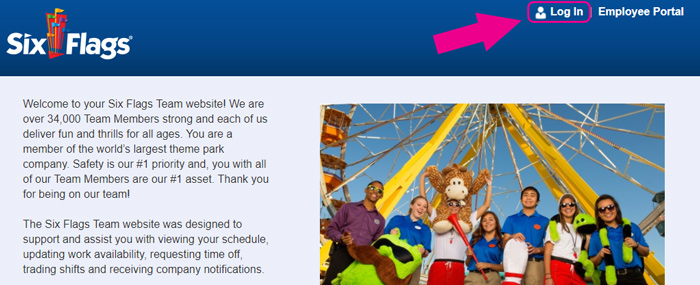
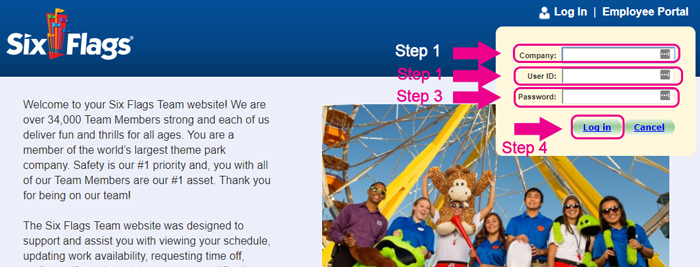
- A drop-down menu will appear, allowing you to input the necessary data.
- Enter the company you work for in the first field of the menu.
- Enter your Six Flags employee User ID in the field next to “User ID”
- Write your Six Flags employee account password in the very last field of the menu.
- If you are an employee, click the “Employee Portal” link on the top far right of the screen, next to the administrator “Log In” link.
- A drop-down menu identical in appearance to the first will appear asking for the same relevant information to be submitted into the respective fields. However, this menu serves as the gateway to employees, rather than administrators.
MyPKS Mobile Login Step-by-Step Instructions
You can also login to the Six Flags employee and admin portal via your preferred mobile device. This can be done simply via your browser, or by the mobile app.
- Open your preferred mobile browser and go to Six Flags employee portal page, sixflags.team.
- Click “Log In” if you are an administrator, and a yellow drop-down will appear.
- Click Employee Portal if you are an employee, and a blue drop-down will appear.
- In either case, enter the company name, user ID and password into the respective fields.
- This process works on both Apple and Android devices
There is currently no Six Flags Employee app. You can access the Six Flags employee portal only through your browser, at sixflags.team.
MyPKS Login Customer Support
If you are experiencing any issues when attempting to login, the website directs you to contact your local Human Resources or ESO department in order to obtain the necessary help and information.
Leave a Reply